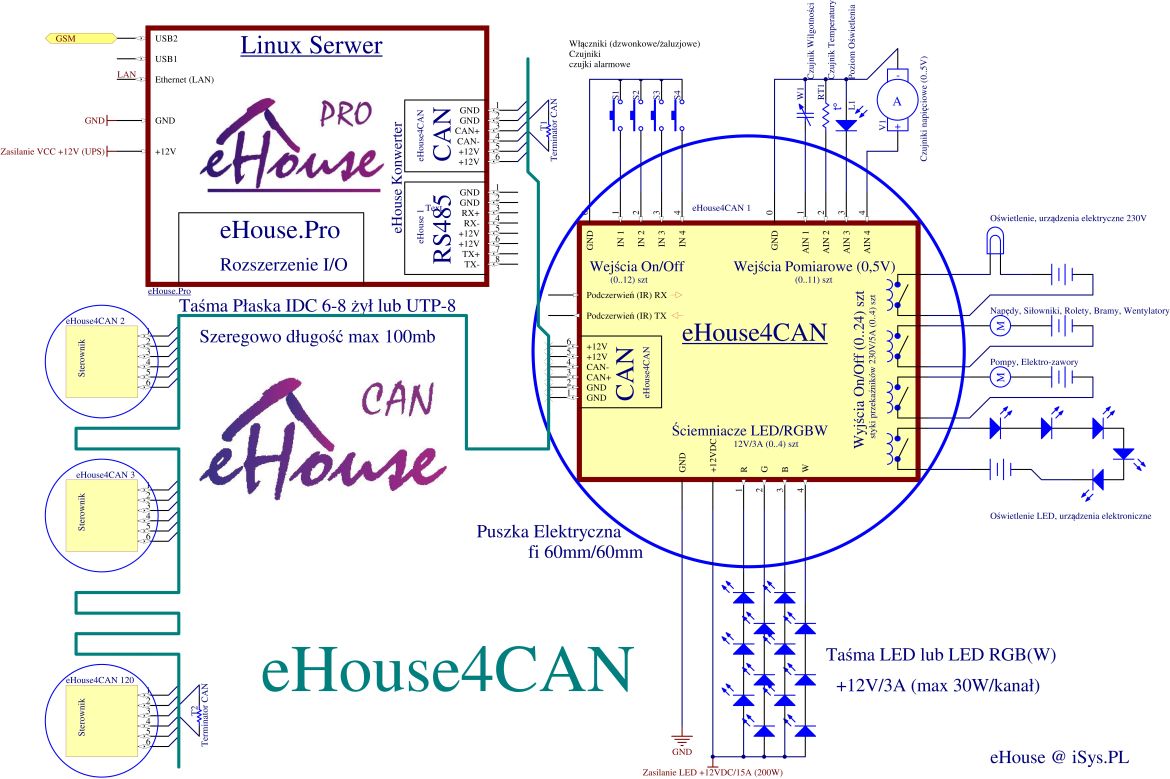
Home automation is easiest to understand as a set of small decisions made automatically: when to turn things on, when to hold back, and when to switch off. That sounds modest, but it is exactly where energy savings often hide. A room does not need to be lit like a runway if no one is in it. A heating system does not need to keep working at full pace because the house is empty. Automation helps those decisions happen quietly in the background.

What is home automation?
In plain terms, home automation means devices or systems that respond to conditions without constant manual input. That can be as simple as a motion sensor turning off a hallway light, or as layered as a thermostat that adjusts temperature based on schedules, occupancy, and weather. The home automation idea is not really about gadgets for their own sake; it is about making routine choices faster, steadier, and less wasteful.
For a broader view of how this fits into a lower-impact home, see our guide to Energy Efficiency and Sustainability.
How automation improves energy efficiency
Automation saves energy in three common ways: it reduces unnecessary use, it makes systems respond more precisely, and it helps people stick to good habits without having to remember every step. Human memory is wonderful, but it is not famous for turning off lights in empty rooms.
- Occupancy control: lights, fans, and some appliances run only when someone is present.
- Scheduling: heating, cooling, and lighting follow a timetable instead of running all day out of habit.
- Sensor-based adjustment: systems react to daylight, temperature, humidity, or motion in real time.
For an official overview of smart-home communication standards, the Zigbee ecosystem is a useful starting point, especially because many energy-saving devices rely on similar low-power coordination patterns.
Examples of automated systems
Some of the most effective energy-saving automations are also the least dramatic. They do not need a showy dashboard; they just quietly stop waste.
| System | What it does | Energy benefit |
|---|---|---|
| Smart thermostat | Adjusts heating and cooling by schedule or occupancy | Reduces wasted runtime when comfort is not needed |
| Automated lighting | Uses motion sensors or daylight sensors | Prevents lights from staying on by accident |
| Smart plugs | Cuts power to idle devices on a schedule | Helps reduce standby power and forgotten loads |
| Automated blinds | Opens or closes based on sun and time of day | Supports passive heating and cooling |
Energy-saving behavior also depends on the building itself. The U.S. Department of Energy’s Energy Saver resources are a helpful reminder that automation works best when it supports insulation, efficient equipment, and sensible habits rather than trying to compensate for everything else.
If you are interested in the temperature-control side of the story, our page on Intelligent Climate Control shows how heating and cooling fit into the same picture.
How to implement automation without overcomplicating it
The short version: start with the places where waste is easiest to spot. A hallway light left on all evening is a good first target. So is a thermostat that keeps heating an empty house because nobody remembered to change the setting before leaving. Tiny victories count. Energy savings are built out of boring little wins, which is rude but true.
- Begin with one problem. Pick a room, appliance, or routine that regularly wastes energy.
- Choose the simplest tool that solves it. A sensor, timer, or smart plug may be enough.
- Check compatibility. Look for devices that work together cleanly instead of creating another app you will ignore.
- Review the result after a few weeks. If the automation annoys people, they will bypass it. That is not a personality flaw; it is engineering feedback.
For readers who want a deeper look at wider home-upgrade strategy, the home page introduces the site’s main themes and related smart-living topics.
A quick note on expectations
Automation is not magic. It will not turn an inefficient home into a perfectly tuned one by itself. But it can make energy-smart behavior easier to repeat, which is often the difference between a good intention and an actual result. The best systems reduce friction: they make the right choice the easy choice.
For a broader industry perspective on connected devices and home automation trends, the International Energy Agency explains how digital control can support more efficient energy use across homes and buildings.
Conclusion
The role of automation in energy efficiency is simple at heart: it helps homes use energy when it is needed and avoid using it when it is not. That means less waste, steadier comfort, and fewer small human lapses adding up in the background. The best place to start is usually not with the fanciest system, but with one routine that wastes energy today and could be improved tomorrow.
If you are planning your own setup, ask one question first: what should this home do automatically so I do not have to remember it every time?