Smart home design, energy efficiency, and connected lighting guidance.

Author: Grant Vale

  • The Impact of Smart Homes on Property Value

    Introduction to smart homes and property value

    Smart home technology can help a property feel more modern, easier to live in, and less expensive to run. That combination is not subtle, which is exactly why buyers notice it.

    When people search for a home, they usually ask the same practical questions: Will it be easy to secure? Will it be comfortable? Will it keep utility bills from becoming a monthly personality test? Smart homes answer those questions by bundling convenience, security, and efficiency into the property itself.

    According to the National Association of Realtors research and statistics hub, buyer expectations continue to shift toward features that simplify daily life. The U.S. Department of Energy also makes the case that energy-conscious upgrades reduce operating waste, which is the sort of math buyers understand even if they do not adore spreadsheets.

    This article explains which smart features tend to influence appraisals, how to read the value signal in the market, and which upgrades are worth considering before a sale.

    For broader context, see the site’s innovative smart home designs and energy efficiency and sustainability pages.

    Bar chart showing estimated property value lift from smart home features such as security, lighting, thermostat, and whole-home automation
    Visible, transferable smart upgrades tend to carry the clearest resale signal.

    How smart features affect home appraisal

    Appraisers do not price a home as a bundle of gadgets. They look for improvements that are permanent, functional, and likely to matter to the next owner. That means the best-value smart features are usually the ones that improve safety, lower energy use, or make the home easier to operate.

    In practice, that often includes the following:

    • Smart security: video doorbells, smart locks, door/window sensors, and monitored alarms.
    • Smart climate control: programmable or learning thermostats, zoning, and room sensors.
    • Smart lighting: automated schedules, motion sensing, and efficient LED fixtures.
    • Connected infrastructure: stronger Wi-Fi coverage, wired access points, and reliable hubs.

    The logic is simple: features that are easy to demonstrate and easy to transfer are easier to value. A buyer can understand a thermostat, a lock, or a lighting scene in under a minute. A proprietary setup that needs a password, a manual, and two browser tabs tends to have a shorter resale career.

    For a buyer-focused overview of efficient systems, the ENERGY STAR smart lighting guide is a useful reference. It shows why lighting controls are often seen as practical rather than flashy.

    Case studies and statistics

    Multiple market studies suggest smart home features can increase perceived property value by roughly 5% to 15% in the right context. That is not a universal guarantee. It is a directional signal: buyers often pay more for homes that feel secure, efficient, and less work to live in.

    One useful way to think about the numbers is by feature type:

    Feature Buyer benefit Value signal
    Smart thermostat Lower utility use and easier comfort control Usually modest but widely appreciated
    Smart security package Safety, remote monitoring, and deterrence Often strong during showings
    Whole-home lighting control Convenience and efficiency More compelling when paired with LEDs
    Integrated automation platform One interface for multiple systems Can stand out if it is simple to use

    Real-estate commentary from the HouseLogic team has consistently pointed to energy and security upgrades as strong resale-friendly improvements. Meanwhile, the Department of Energy’s thermostat guidance reinforces the practical savings side of the story.

    That combination matters because buyers do not only buy square footage. They buy reduced friction. A house that already behaves well has an advantage over one that politely hands every inconvenience to the next owner.

    Tips for homeowners looking to sell

    If resale is the goal, choose upgrades that are visible, durable, and easy to explain. The smartest smart-home move is often the least dramatic one.

    1. Start with the highest-visibility upgrades. Smart locks, thermostats, and lighting controls are easy for buyers to understand.
    2. Keep the system transferable. Make sure accounts, passwords, and ownership handoff steps are documented.
    3. Show the savings. Utility history, device dashboards, and energy reports help make the case.
    4. Avoid over-customization. A house that requires a private instruction manual for the hallway lights is less persuasive than one with a clean, simple setup.
    5. Bundle the story. Position smart features alongside energy efficiency, comfort, and security rather than as isolated gadgets.

    If you want a practical pairing strategy, review the site’s smart home design ideas and sustainability guidance. Those pages help frame the upgrades as part of a coherent system, not a pile of accessories.

    Conclusion

    Smart homes can raise property value when the technology improves day-to-day living in ways buyers can actually feel. Security, efficiency, and convenience are the three levers that matter most.

    If you are preparing to sell, focus on smart upgrades that are clear, transferable, and easy to trust. That is the difference between a useful feature and an expensive curiosity.

    For broader site context, visit the homepage.
  • A Beginner’s Guide to Intelligent Climate Control

    A Beginner’s Guide to Intelligent Climate Control

    Intelligent climate control isn’t about gadgets for their own sake—it’s about keeping your home comfortable with less wasted heating and cooling effort.

    When you start looking into smart thermostats and climate automation, you’re probably asking: Will it actually make day-to-day comfort easier? What sensors and schedules really do? Where does automation help—and where is manual control better? As the U.S. Department of Energy notes, heating and cooling are often major contributors to home energy use, so smarter control strategies can matter.

    That’s also why credible building science organizations encourage homeowners to focus on control and efficiency fundamentals rather than chasing one “magic device.” For background on HVAC energy considerations, see the U.S. Department of Energy: Heating and Cooling and for thermostat/controls basics, the Energy Saver guidance on thermostats.

    In this beginner’s guide, you’ll learn what intelligent climate control means in practical terms, how thermostats, sensors, and zoning work together, and how to set comfort profiles by room and time of day—without turning your HVAC into a confusing science project.


    Table of contents


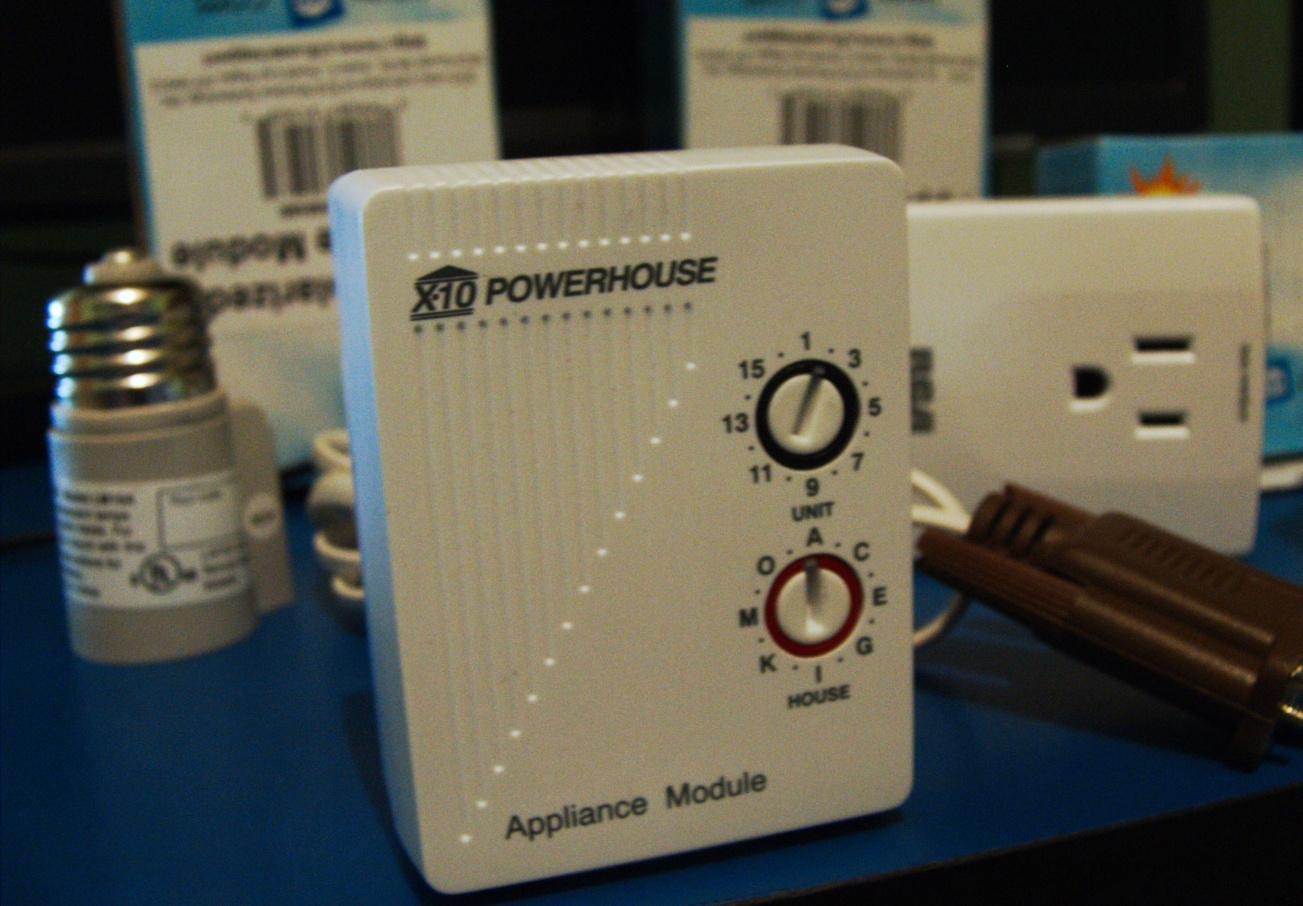
    A smart home adapter on a countertop, illustrating connected home climate control basics

    What intelligent climate control means in practical terms

    Intelligent climate control is a control approach that adjusts heating and cooling behavior based on more than a single wall thermostat reading. Instead of “set it and forget it,” it uses a combination of:

    • Current indoor conditions (temperature and sometimes humidity)
    • Environmental context (weather forecasts or outdoor temperature)
    • Home behavior (occupancy patterns and room-level activity)
    • Heating/cooling goals (comfort preferences and time-based routines)

    The goal is simple: keep comfort stable while reducing unnecessary cycling, over-heating, or over-cooling. That typically requires less “manual micromanaging,” but it still depends on choosing sensible settings for your household.

    Thermostats, sensors, zoning, and schedules

    Most climate automation systems combine four building blocks.

    1) Thermostats: the decision center

    Your thermostat (wired or wireless) sets the baseline temperature control logic. Many modern thermostats can learn routines, adapt start times, and coordinate with schedules so the system reaches the target when you need it—not just whenever it feels like it.

    2) Sensors: improving accuracy beyond “one spot”

    A wall thermostat measures the temperature where it’s mounted. In real homes, that can be misleading: hallways run cooler, sunny rooms heat up quickly, and bedrooms can lag behind.

    Room or “remote” sensors help by sampling temperatures where people actually spend time. Some setups also track humidity for better comfort and to avoid drying/clammy conditions.

    3) Zoning: comfort by area, not by house average

    Zoning means directing heating/cooling output to different parts of the home. When zoning is available, automation can target comfort where it matters most (for example, keeping living areas comfortable while an unoccupied room stays slightly wider).

    Not every home has zoning, and upgrading HVAC components can be more involved. The beginner path is to start with controls that work with what you already have.

    4) Schedules: giving automation a “when”

    Schedules are the foundation for predictable comfort. Intelligent features then refine timing (preheating or precooling), reducing the temptation to frequently adjust settings.

    As a baseline, many homeowners do well with a small set of comfort periods (wake, work/school, evening, sleep) instead of dozens of micro-adjustments.

    How occupancy and weather data can help

    Once comfort targets are defined, the system still needs to decide when to act. Two signals are especially useful.

    Occupancy patterns: “who’s home”

    Some setups infer occupancy from mobile device presence, motion sensors, or learned daily routines. When the home is empty, the system can widen the comfort range slightly to avoid unnecessary conditioning.

    Important: occupancy-aware behavior works best when your home’s patterns are fairly consistent (or when you can easily update profiles after changes).

    Weather data: preparing instead of reacting

    Outdoor conditions affect indoor temperature trends. With weather awareness, controls can respond earlier—aiming to reach comfort goals by the time you want them, rather than waiting for the indoor temperature to drift.

    This is less about “predictive magic” and more about reducing overshoot and undershoot.

    Comfort settings for different rooms and times of day

    Beginner-friendly comfort settings are about consistency and clear priorities. A practical approach:

    Time period Typical goal Beginner-friendly setup idea
    Morning Arrive comfortable Use a “wake” profile; let automation handle start timing
    Day (away) Maintain, don’t overcondition Widen the range slightly for unoccupied rooms
    Evening Comfort for main living time Focus on occupied zones; avoid constant re-tuning
    Night Stable sleep comfort Use a “sleep” profile and keep changes minimal

    If you have room sensors, start by identifying the rooms you care about most (usually where you sleep, work, or spend the most time). Then set goals for those rooms first. Small adjustments are safer than big swings, especially during seasonal transitions.

    Humidity and comfort

    If your system supports humidity monitoring, treat humidity as a comfort factor—not a separate project. The aim is usually to avoid conditions that feel muggy or overly dry, while keeping the temperature stable.

    When automation helps (and when manual control is better)

    Automation is valuable when it reduces repetitive effort and smooths out comfort variation. But there are moments when manual control makes more sense.

    Automation is often a win when:

    • Your daily routine is predictable
    • You have temperature swings between rooms
    • You frequently forget to adjust settings (or adjust too often)
    • You want fewer “trial-and-error” adjustments during the week

    Manual control is often better when:

    • Life patterns are irregular (shift work, frequent travel, unexpected guests)
    • You want immediate changes for short events (for example, a quick party window)
    • You’re still learning how your home responds to heating/cooling

    A healthy beginner mindset: automation should do the baseline work, while you keep the option to override temporarily and update settings as you learn.

    Questions to ask before upgrading

    Before you replace a thermostat or add sensors, use this checklist. It protects you from the most common “it sounded good, but it didn’t fit” outcomes.

    • What exactly is your goal? Better comfort in bedrooms? More consistent temperatures? Fewer adjustments?
    • How many zones do you need? If you only want help for one or two rooms, remote sensors may be enough.
    • How accurate is the current thermostat location? Is it near drafts, direct sun, or heat sources?
    • How easy is it to update schedules? Your system should handle schedule changes without complex reconfiguration.
    • Does it support the features you will actually use? Presence detection, weather awareness, and humidity tracking are useful only if they match your routine.
    • What’s the fallback plan? If automation is wrong, can you quickly switch to manual comfort targets?

    If you want additional background on how thermostats and controls affect energy use, start with the U.S. Department of Energy’s Thermostats overview (and confirm the recommendations align with your climate and HVAC setup).


    Conclusion: start simple, then refine

    Intelligent climate control is most useful when it’s treated as a comfort system, not a gadget collection. Begin with clear schedules, understand how thermostat placement and room differences affect readings, and add sensors/zones only as they solve a real problem in your home.

    Key takeaways:

    • Use automation to smooth comfort and reduce repetitive adjustments.
    • Improve accuracy with sensors where temperature varies by room.
    • Let occupancy and weather awareness help with timing—without removing your ability to override.
    • Choose a small number of comfort periods that match your household rhythm.

    Ready to explore how smart home choices support a greener, more efficient home? Visit Energy Efficiency and Sustainability. Or if you’d like help planning your next upgrades, contact the team via our contact page.